
Understanding Object-Oriented Programming in JavaScript

Hi everyone! In this article we're going to review the main characteristics of object oriented programming (OOP) with practical JavaScript examples.
We will talk about OOP main concepts, why and when it can be useful, and I'll give you plenty of examples using JS code.
Imagine you work at a car factory. Every single day, hundreds of cars roll off the line. They're all different colours, different engines, different names. But they're all built from the same blueprint.
Nobody draws a brand new blueprint for each car. That would be insane. They use one blueprint, and stamp out as many cars as they need.
That blueprint? That's a class. Those cars? Those are objects. And this whole idea of organising your code around blueprints and objects — that's OOP.
1. What Does OOP Actually Mean?
OOP stands for Object-Oriented Programming. Big words, simple idea.
Instead of writing a bunch of loose instructions, you package related data and actions together into neat little bundles called objects.
Think about a real dog:
It has properties — a name, a breed, an age
It has behaviours — it can bark, eat, run
In OOP, you'd build a Dog blueprint that captures both of those things. Then every dog you create from that blueprint gets its own name, breed, and the ability to bark.
Why bother? Three big reasons:
Reusability — write the blueprint once, create a hundred objects from it
Organisation — related stuff stays together, code is easier to read
Less repetition — stop copying and pasting the same code everywhere
2. The Blueprint → Object Relationship
Let's make this super concrete before we touch any code.
A class is the blueprint. It describes what an object should look like and what it can do. It's just a plan — it doesn't actually exist in memory yet.
An object (also called an instance) is a real thing created from that blueprint. It exists. It has actual values. You can use it.
One blueprint → unlimited objects. Each object is independent.
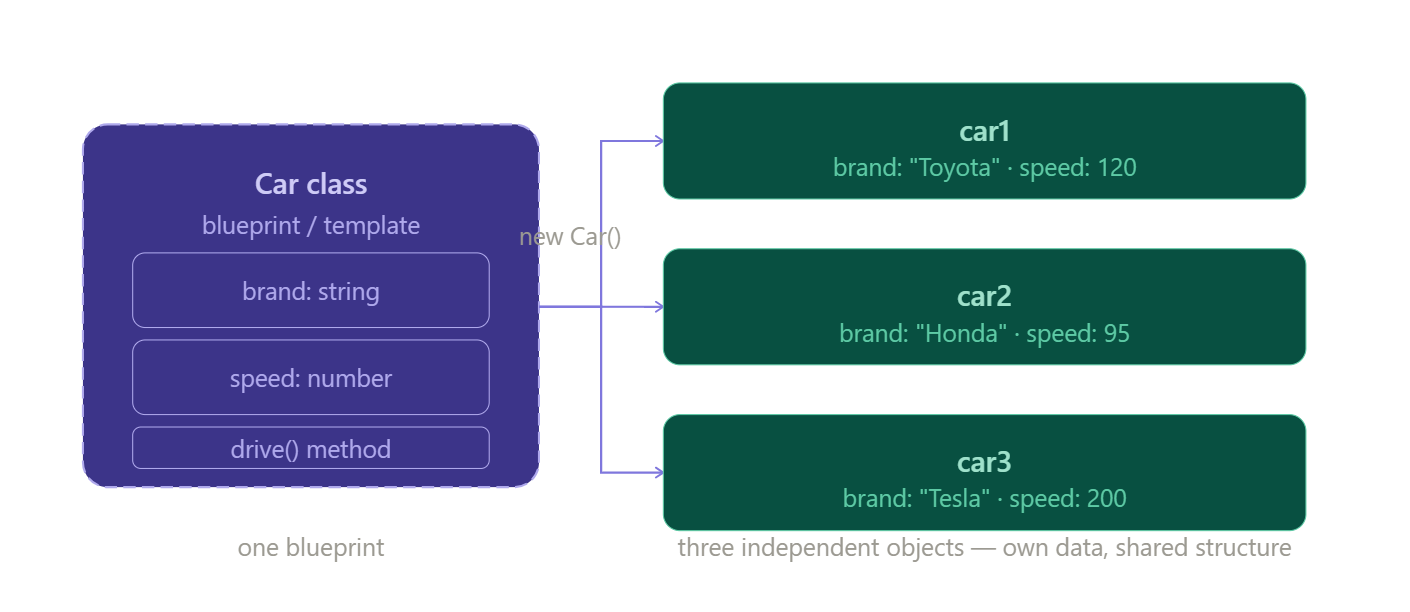
The blueprint lives in your code once. The objects? You can make as many as you want.
3. What is a Class in JavaScript?
A class is just a template written in code. You define it once, then use it to create objects whenever you need them.
Here's the simplest class you can write:
js
class Car {
  // everything about a Car goes in here
}
That's it. That's a class. Capital C by convention — always capitalise your class names. It's how other developers know "hey, this is a class."
4. The Constructor — The Factory Worker
When you build a car in a factory, someone has to stamp in the specific details for each car. The right colour, the right engine. That worker is the constructor.
The constructor is a special method that runs automatically the moment you create a new object. It sets up all the starting values.
js
class Car {
  constructor(brand, speed) {
    this.brand = brand;
    this.speed = speed;
  }
}
See that this? It means "this specific object being created right now." So this.brand = brand is saying: "take the brand I was given, and attach it to this particular car."
5. Creating Objects from the Class
Once your class is ready, you use the new keyword to stamp out actual objects from it:
js
let car1 = new Car("Toyota", 120);
let car2 = new Car("Honda", 95);
let car3 = new Car("Tesla", 200);

console.log(car1.brand); // "Toyota"
console.log(car2.speed); // 95
console.log(car3.brand); // "Tesla"
Each new Car(...) call runs the constructor, plugs in the values, and hands back a fresh independent object. car1, car2, and car3 are completely separate — changing one doesn't touch the others.
6. Methods — Teaching Your Object What to Do
A method is just a function that lives inside the class. It describes what the object can do, not just what it is.
js
class Car {
  constructor(brand, speed) {
    this.brand = brand;
    this.speed = speed;
  }

  drive() {
    console.log(this.brand + " is driving at " + this.speed + " km/h!");
  }

  brake() {
    this.speed = 0;
    console.log(this.brand + " has stopped.");
  }
}

let car1 = new Car("Toyota", 120);
car1.drive();  // "Toyota is driving at 120 km/h!"
car1.brake();  // "Toyota has stopped."
Every object made from this class automatically gets the drive() and brake() methods. You write the method once, every object uses it. That's the reusability magic right there.
Here's what the full anatomy of a class looks like:
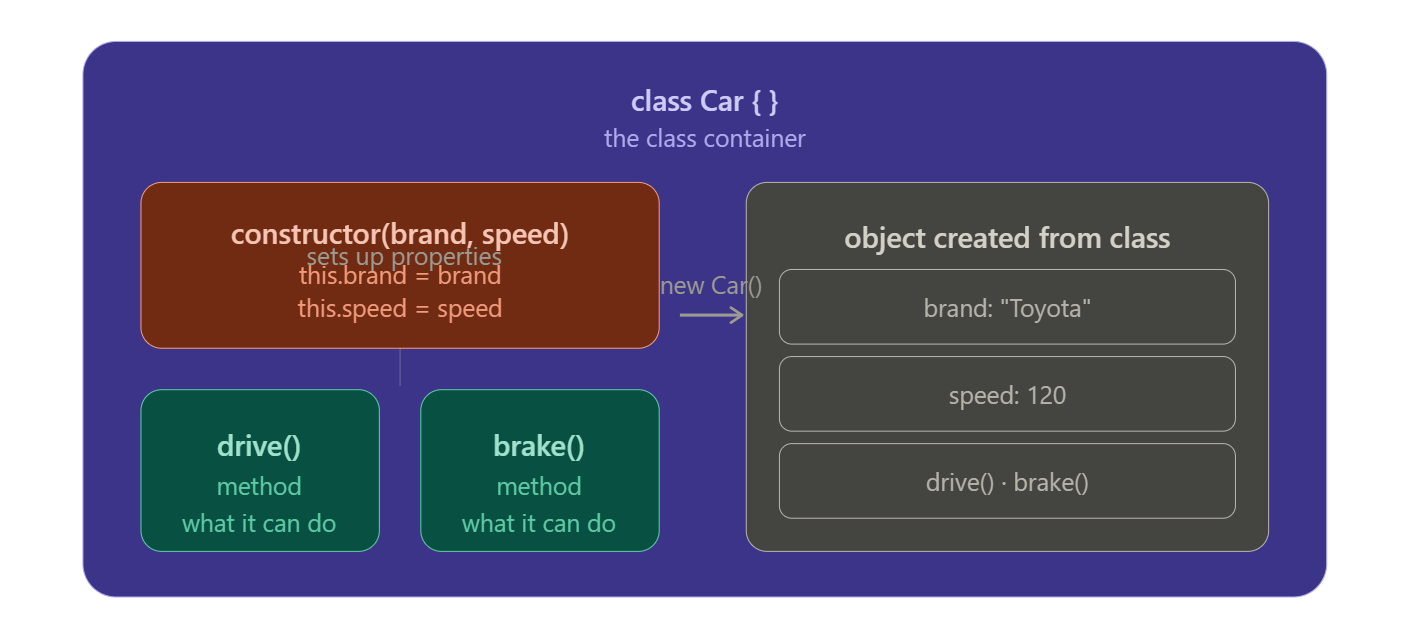
7. Encapsulation — Keeping Things Tidy
This is a fancy word for a simple idea. Encapsulation just means: keep related stuff together, and hide the messy details inside.
Think of your phone. You press the camera button and it takes a photo. You don't see the code that opens the lens, adjusts the exposure, and saves the file. All that complexity is hidden inside — you just get a simple button.
In OOP, you put all the data (properties) and actions (methods) inside the class. The outside world just calls car.drive() and doesn't need to worry about how it works internally.
js
class Car {
  constructor(brand, speed) {
    this.brand = brand;
    this.speed = speed;
  }

  drive() {
    // All the "how it works" lives in here
    console.log(this.brand + " is driving at " + this.speed + " km/h!");
  }
}

// Outside world just calls this — clean and simple:
car1.drive();
That's the core idea. The complexity lives inside the class. The user of the class gets a clean, simple interface.
8. The Assignment — Build It Yourself
js
// Step 1: Create the Student class
class Student {
  constructor(name, age) {
    this.name = name;
    this.age  = age;
  }

  // Step 3: Method to print student details
  printDetails() {
    console.log("Name: " + this.name + ", Age: " + this.age);
  }
}

// Step 4: Create multiple student objects
let student1 = new Student("Arjun", 19);
let student2 = new Student("Priya", 21);
let student3 = new Student("Rahul", 20);

student1.printDetails(); // "Name: Arjun, Age: 19"
student2.printDetails(); // "Name: Priya, Age: 21"
student3.printDetails(); // "Name: Rahul, Age: 20"
Notice what we did here: we wrote the Student blueprint once. Three students, zero repeated code. That's OOP doing its job.
The Takeaway
A class is just a blueprint. Objects are real things stamped out from that blueprint. The constructor sets up the starting values. Methods are the actions the object can perform. And encapsulation means all that logic stays neatly packed inside the class — clean, reusable, and easy to understand. Once this clicks, you'll start seeing classes everywhere in real-world code.